Myths, Media, Motives: A Cautionary Tale

Housing Market Media Mayhem

As a homeowner, I have a heightened interest the housing market, to which my financial future is closely tied. But it’s not just “the housing market” in the abstract that makes me nervous right now. More than that, its the ways different media spheres are talking about the market that make me shudder.

Given my position, when I ended up reading the eFinanceDirectory article “Rent Vs. Buy Myths That Ruined the Housing Market,” I got a little sad. For reasons I’ll explain later, I’m confident this deeply troubling article will reach millions of people positioned to read uncritically.

First, Don’t Be Wrong

In short, the article is a run-down of five “myths” that, the unnamed author claims, caused the demise of the housing market. Each piece of the argument has problems, but I’ll focus on two:

“Myth #1: Renting is Like Throwing Your Money Away”

The argument here is that renters, unlike homeowners, “pay for one thing every month: shelter. They don’t pay interest to the bank, property taxes, or maintenance fees.” With “the money they save by renting,” they can “invest in stocks, bonds and other vehicles.” This argument—that renters pay less money, all else being equal, than owners—is echoed throughout the piece.

There’s a massive misunderstanding of real estate here, if not of basic capitalist economy. Renters write only one check each month, but it’s a rare landlord who’s not making sure her costs—including mortgage, taxes, insurance, and upkeep—are covered, and indeed that she’s making a profit. If I can rent an apartment for $850 each month, my landlord’s monthly PITI payment is perhaps hundreds of dollars less than that. In other words, landlords, in the interest of making money at their jobs, take a profit.

So, in seeking shelter, my choices are to come up with some initial capital (a noteworthy hurdle, to be sure) for the privilege of building equity with, let’s say, a $550 payment each month. Initially, only a small portion of my payment goes towards the principal of my loan, but out of an $850 rent check, none of it builds equity. Ever. So not only am I spending more for shelter if I’m renting, but I don’t get to keep any of my money. If I am lucky enough to have the choice, then renting is, indeed, throwing my money away (unless I really like my landlord).

“Myth #2: There are Tax Benefits to Owning”

There’s more weird logic here: “Mortgage interest can only be deducted from taxable income. This essentially means that buyers pay a dollar just to save 30 cents.”

The first sentence is true, but what it “essentially means” is that homeowners save “30 cents” on the dollars that they have to spend anyway for shelter. Again, given two equal payments, the renter comes out behind, every time. (And again, the payments, rent and PITI, are never equal.)

But it doesn’t end there: “Furthermore, deducting interest has no tax advantage unless a buyer pays so much in interest that the amount exceeds the standard deduction that everyone—including renter—is allowed to take.”

The first sentence is false. Deducting interest has no tax advantage unless the interest combined with all the myriad other deductions one can itemize exceeds the standard deduction. I should note here that I’m a homeowner in Pittsburgh, a city with relatively low property tax, and that I bought when the market last bottomed out, so I pay about as little interest as one can in this country (5.625%).

Despite the insane bargain I’ve got, I’ve itemized my deductions every year since I bought the house, and not once before. In other words, my mortgage interest presents a significant tax advantage, as it would for just about everybody out there.

Beyond Wrong: Myths and Motives

The “Myths” article is worse than just being inaccurate, though. There is, in the end, a particular political agenda advanced in the piece, one that ought not be part of something that projects itself as impartial financial advice. (“Our goal is to provide you non-biased original articles about the housing and mortgage issues that matter to you most,” reads introductory copy on the site’s home page.)

The piece reads, “Potential buyers bought into all sorts of rent vs. buy myths to justify buying houses that they could not afford during the boom.” Placing blame on the buyers make a certain amount of sense, on the face of it: Why didn’t they understand that an adustable-rate mortgage, for example, would come back to bite them?

That’s a valid point. However, holding buyers solely responsible is also a tactic that conservative pundits often use to keep government spending down. Proposed ARM bailouts, for many conservatives, aren’t appropriate use of tax money. If you blame the borrowers, then you don’t have to give them anything. For me, that argument doesn’t hold, as it’s unclear how the history of the situation should have anything to do with economic arguments for and against bailouts. The point is, it’s a popular argument for a conservative position on the mortgage crisis.

(Another article on the site, “The Truth About Home Prices and Mortgage Bailouts,” makes good on this hidden motive, with falsehoods more problematic than in the “Myths” piece.)

Reader Beware

There’s an obvious problem with purportedly “unbiased” advice that’s so deeply biased. Notwithstanding that issue, there’s a larger lesson here. As readers, we have to look out for ourselves. I found the “Myths” piece linked to from one of my favorite sites, kottke.org. Though I find absolutely no fault with the site for posting the link, I worry for its visitors, who numbered 600,000 per month two years ago, and who has at least 100,000 subscribers in Google Reader alone.

It’s our human propensity to believe trusted sources—the limits of which can be extreme indeed—that can get us into hot water in situations like this. A site I and many others trust and respect linked to an article that’s misleading, untruthful, and deeply biased. My worry here is that because of our relationship to the site, we might shed our usual skepticism and read a troubling article more favorably than we should. I hate to advocate widespread suspicion, but surely some measure of caution is in order, no matter where we get our reading material.
Firefox Horizontal Trackpad Scrolling

UPDATE: Smoothwheel’s developer took the time to write a thoughtful comment; please find it below the post.

I’ve spent so, so long trying to figure out how to get horizontal trackpad scrolling working in my installation of Firefox (on a Mac, running 10.3 – 10.5 while the problem persisted). I finally got it, and tracked it down to a problem extension: Smoothwheel.

For me, scrolling horizontally on the trackpad had scrolled the window vertically, for as long as I could remember. All the hints I saw indicated that a slight change to the preferences in about:config would resolve the issue, that the defaults in Firefox were for horizontal scrolling to move forward and backward in the history.

But those hints were from 2005, and I don’t think the forward/backward behavior has been the default for at least a year. So I started looking through my add-ons for potential problems.

The only one I had that should’ve been affecting scrolling behavior was Smoothwheel, which has options for compatibility mode and disabling. Sadly, neither fixed the problem. I tried disabling Smoothwheel at the Firefox level. No dice. Then I tried uninstalling it. Still no fix.

At this point, I thought, it couldn’t be Smoothwheel, so I went back to endless combinations of mousewheel and mousewheel.horizscroll settings in about:config. But nothing helped.

In the end, I took a wild shot and decided to delete [Profile Directory]/chrome/smoothwheel/ entirely to fix the problem. Very strange behavior for an add-on, residing in the chrome folder and not respecting disabling and uninstalling…

Based on the number of problems listed on Smoothwheel’s mozdev page, I can’t imagine I’m the only one having problems here.

Zotero vs. Endnote for Fall of ’07

When you google zotero endnote, most of the top results are blog posts from mid- to late-2006, lamenting functionality absent from Zotero.

For Zotero’s sake, I want to point out here that most of those issues have been  addressed. Zotero now has:

If you haven’t looked at Zotero lately, give it another try. I had given up on it last year, and was just trying to get back into EndNote. My frustration with the interface made me think about Zotero again, and here we are.

Bringing Google Calendar to My Desktop

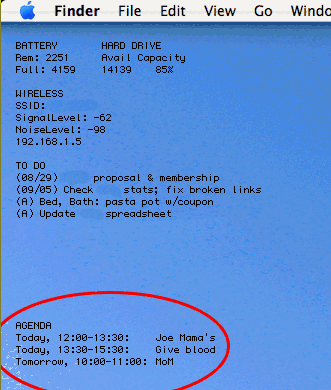
ScreenshotFor a long time, I’ve wanted fast access to Google Calendar’s agenda view. Essentially, I don’t like waiting for the page to load every time I have to remind myself of the time of some appointment in the next day or two. Feel free to read my solution and skip my disclaimers and ramblings.

The major challenges for me have been (1) that I don’t care to open iCal, since I never use it otherwise, (2) that Google presents all its data on one line (making it a bit more complicated to use Unix commands that rely on line endings), and (3) that I don’t want to take up a whole lot of bandwidth or system resources.

I think I’ve finally got a solution, and though it’s a bit complex, it’s worth sharing here. I should mention now that it is Mac-only, though I’m sure capable Windows or Linux users could adapt it readily enough.

My system involves a number of components, some non-standard (in the Mac OS), some optional. But here they are, just so you have a sense up front of where we’re headed:

  • A curl command to retrieve data from my calendar’s RSS feed
  • A launchd agent to run the curl command periodically (UPDATE: I no longer use this part)
  • Lingon to set up the launchd agent (UPDATE: I no longer use this part)
  • A Perl script to parse the XML from the calendar feed (UPDATE: The perl script now also runs the curl command directly)
  • A few Perl modules to support the script
  • Geektool to send the output of the script to my desktop periodically

What I will discuss here is how I implemented a system that is perfect for my needs. I won’t really suggest modifications or alternatives, though I welcome such thoughts in the comments.

Still, a few limitations are worth noting:

  1. As it stands, this doesn’t address multiple calendars; I have only one that I check with any frequency
  2. I use 24-hour time, because I don’t care enough to convert to 12-hour; if you do, please post your changes.
  3. At this point, the launchd command fails if I go without an Internet connection for more than 10 minutes or so (which causes the curl command to fail). I can restart it easily enough, and I usually have a connection. But, consider this fair warning, and give us a comment if you have any ideas.
  4. As I’m not an expert in any of this, really, I don’t know how portable my solution is, nor how efficiently my code is written. Comments are welcome.

Otherwise, happy reading.


Using curl to Get the Data

First, create a plain text file in your user directory. Open a new terminal window, and type
pico .gcalfeed.xml

Then type Ctrl-O, then the enter key. Finally, type Ctrl-X to exit pico.
I use the following curl command to retrieve my calendar’s private feed from Google. Note that the lines are broken artificially; otherwise you’d have a wicked horizontal scroll bar right now.

/usr/bin/curl -f -s
http://www.google.com/calendar/feeds
/[your.gmail.username]%40gmail.com/
[your-private-calendar-feed]/full
-o /Users/[your-OS-X-user-directory]/.gcalfeed.xml

First, note that I specify the full path to curl, which will become necessary once we’re using launchd to run it. The -f flag makes the command fail silently (for example, if I have no Internet connection). The -s flag keeps curl’s bulky status meters out of my system logs.

The next three lines are the URL, which you can retrieve in its entirety by going your calendar’s details page in Google Calendar. To grab the XML link for your Private Address, click the XML button in the Private Address section and copy the URL. Be sure you change the end of the URL from “/basic” to “/full” before you use it.

The last flag above, -o, tells curl to save the output to a file. Mine is in my OS X user directory to avoid permissions issues; it’s got a period at the front of its name so I don’t have to look at it all the time.

It’s worth trying all this from the OS X Terminal with your own information till you’re certain it works for you.

Using launchd to Run the curl command

UPDATE: The latest version of the script bypasses launchd altogether, simple allowing geektool to call the script directly. In other words, with the version linked to below, you can skip this section.

I used Lingon to set this up, and that’s probably the easiest way for you, too. In Lingon, click the New button. Leave the “My Agents” radio button selected, and click the Create button. Click go to the Expert panel, select all, and paste in the XML below. (Don’t worry if the indentation doesn’t show up.)

Newer versions of Lingon don’t have the Expert panel. In that case, you can also create a text document with this XML at ~/Library/LaunchAgents/ (create the LaunchAgents folder if it doesn’t exist). Follow the com.devan.gcalfeed naming convention, but append “.plist” to the filename. Once you’re done, you’ll have to log out and back in, or restart.

<?xml version="1.0" encoding="UTF-8"?>
<!DOCTYPE plist PUBLIC "-//Apple Computer//DTD PLIST 1.0//EN" "http://www.apple.com/DTDs/PropertyList-1.0.dtd">
<plist version="1.0">
<dict>

<key>Label</key>
<string>com.devan.gcalfeed</string>
<key>ProgramArguments</key>
<array>

<string>/usr/bin/curl</string>
<string>-f</string>
<string>-s</string>
<string>http://www.google.com/calendar/feeds
/[your.gmail.username]%40gmail.com/
[your-private-calendar-feed]/full</string>
<string>-o</string>
<string>/path/to/.gcalfeed.xml</string>

</array>
<key>RunAtLoad</key>
<true/>
<key>ServiceDescription</key>
<string>DownloadGCalFeed</string>
<key>StartInterval</key>
<integer>300</integer>

</dict>
</plist>

First, where I have com.devan.gcalfeed and DownloadGCalFeed (under the Label and ServiceDescription keys), you can have whatever you want. It is worth using the reverse naming convention for the former, as it will make the process readily identifiable in case you run into trouble.

Next, both the URL string and the string containing the path to your XML file should be on a single line, but once again lines have been artificially broken here.

Finally, theRunAtLoad key tells launchd to run this process once when it is loaded (which happens, among other times, when you log in), and the StartInterval key tells launchd how many seconds should pass between invocations of the process.

Once you’ve pasted this in and included your own information, click Lingon’s Save & Load button.

Using Perl to parse the XML

Download this Perl script (UPDATED to include checking for multiple calendars and with other tweaks; changes should be clear within) and uncompress it. Place gcal.pl somewhere on your system; I chose /usr/local/bin, but do what you like. Also, on lines 34 and 38, you’ve got to include the path to your own XML file.

For the script to work, you’ll need the following Perl modules installed. I use CPAN for installation, which in this case is a good idea because some of the modules have dependencies on others.

  • XML::Simple
  • Data::Dumper
  • Date::Parse

I’ve got a lot of commenting in there, but in brief, the script grabs non-all-day events from today, tomorrow, and the next day, and returns the title and date and time information for each one. Then, it grabs all-day events whose date span includes today’s date, and returns their information.

(In fact, it doesn’t grab them in that order; the last few lines do the sorting to get them that way. All the same.)

Typical output looks like this:

Today, 12:30-14:00: Meet with Andrés
Tomorrow, 08:00-09:00: Call with client
Tomorrow, 19:00-20:00: Dinner at Casbah
Through 09/14: Off from work

UPDATE: A sharp commenter alerted me to the fact that I abandoned this formatting in favor of something much more compact, just a single asterisk next to today’s events. Instructions for restoring the “Today: “, “Tomorrow: “, and “Through: ” labels appear in my response to him/her in the comments below. (Find “third problem” on this page.)

Using Geektool to View the Data

This is the easy part. Install Geektool, if you haven’t already, and set up a new entry. Make it a Shell command, and enter the following:

/path/to/your/gcal.pl

I have GeekTool run the script every 300 seconds.

Overheard at PodCamp

After a short while at PodCamp Pittsburgh 2, my ears were already overfull of emphatic platitudes and in-jokes:

  • “Your social media is you.”
  • “If you can’t delegate, you are dead, in this business, or non-business.”
  • “Did I just break the InterWebs? I hate when I break the InterWebs.”
  • “It’s all about where you are, and who you know—that hasn’t changed. That’s been Hollywood’s mandate for…120 years.”

Fuzzy math aside, I think the problem is that nobody quite knows what to say about social media, podcasting, web video. When things grow without top-down intervention, when new development comes from the periphery (or when there is no center, you might say), it’s hard to imagine how a conference like this one can amount to more than information sharing.

That can be valuable, and I suppose there’s something to be said for lonely bloggers getting in a room together. But so far, everyone seems to feel pressured to disseminate wisdom rather than to share insight.

Maybe I’m just grouchy ’cause I got here too late for any of the good schwag. And I really shouldn’t complain, anyway; I got to catch The Wailers playing a couple tunes for free at the DiverseCITY festival.