Any Three Darts

Since I bought my dartboard, I’ve been trying to find a yardstick for my own performance at 301. Three-dart average scores for pros are easy to find, but I haven’t come across any kind of guide for beginners.

Nor, I should say, am I convinced that a three dart average is the best way to track one’s progress at the start; something like triple-20s per round might be better. And T20 is just the beginning—closing is a different story altogether.

Despite these concerns, desperate for procrastination, I decided to calculate the average score for three darts thrown at random (not that the notion of a random throw makes much sense).

Please, let me know in the comments if you see any mathematical…er…improprieties.

Assumptions

Each of these assumptions corrupts my calculations in some way.

  • An equal distribution of probabilities across all points on the face of the board. Basically, I discount gravity as a factor.
  • The absence of metal rings on the board. In my measurements of the board, I measure to and from the center of each metal ring. I do have one of those boards with thin wire and no staples, but I still occasionally get some bounceback. I’m pretending otherwise.
  • 100% success at hitting the board. In my figures, no dart misses the board entirely. But in my living room, one wall is covered with a two-foot-wide strip of thick, blue high-density foam.

Method

  1. Find the total area of the board.
  2. Calculate the area of each of the five scoring sections (double bull, single bull, triple ring, double ring, singles).
  3. Calculate each area as a percent of the whole
  4. Determine the average score for one dart across each section.
  5. Multiply each average score times each area percentage, and add the five products. The result is the average score for a random dart, of which there is, of course, no such thing.

Calculations

Note that I never multiply out all the πs. Since I’m ending with percentages (which are just ratios of x:100), I don’t really need to. I’ve also rounded everything to reasonable decimal places.

  1. Total area = πr2 = π16.8cm2 = 282.24π cm
  2. Areas of individual sections :
    • Double bull: = π1.4 cm2 = 1.96π cm
    • Single bull: = total single bull area – double bull area
      = π3.4 cm2 – 1.96π cm
      = 11.56π cm – 1.96π cm
      = 9.6π cm
    • Triple ring:
      = area of outer triple circle – area of inner triple circle
      = π10.5 cm2 – π9.5 cm2
      = 110.25π cm – 90.25π cm
      = 20π cm
    • Double ring:
      = area of outer double circle – area of inner double circle
      = π16.8 cm2 – π15.8 cm2
      = 282.24π cm – 249.64π cm
      = 32.6π cm
    • Singles: = Total board area – the other areas
      = 282.24π cm – 9.6π cm – 20π cm – 32.6π cm
      = 218.08π cm
  3. Areas as Percentages
    • Double bull: = (100 x DB area) / total area
      = 196π cm / 282.24π cm
      = .68%
    • Single bull: = 960π cm / 282.24π cm
      = 3.4%
    • Triple ring: = 2000π cm / 282.24π cm
      = 7.09%
    • Double ring: = 3260π cm / 282.24π cm
      = 11.55%
    • Singles: = 21808π cm / 282.24π cm
      = 77.27%
  4. Average scores:
    • Singles: 10.5 (average of the sum of all whole numbers from 1 to 20)
    • Triple ring: 31.5 (singles average x 3)
    • Double ring: 21 (singles average x 3)
    • Single bull: 25 (can’t score anything else)
    • Double bull: 50 (exactly)
  5. Areas x Scores = (.0068 x 50) + (.034 x 25) + (.0709 x 31.5) + (.1155 x 21) + (.7727 x 10.5)
    = 13.96 points

Discussion

So, barring typos, miscalculations, and flawed assumptions of which I’m unaware, a dart hitting a board in a random spot will yield, on average, 13.96 points. Any three such ideal darts will yield just under 42 points.

In a game of 301, 42 points per turn would get you down under 60 (which is where I can start thinking about closing) in six turns, or 18 darts.

What should you conclude about your own game? Probably not much. For my part, I’m just noting that, as long as I’m shooting for T20, I’m doing a better than random, mostly getting down under 60 in 4, 5 or 6 rounds. That makes me, I would say, and average 301 player.

However, once it’s time to close, I’m not as good—and I don’t even play by the real rules, where you must close with a double. So, time to play some ‘Round the Clock.
Zotero vs. Endnote for Fall of ’07

When you google zotero endnote, most of the top results are blog posts from mid- to late-2006, lamenting functionality absent from Zotero.

For Zotero’s sake, I want to point out here that most of those issues have been  addressed. Zotero now has:

If you haven’t looked at Zotero lately, give it another try. I had given up on it last year, and was just trying to get back into EndNote. My frustration with the interface made me think about Zotero again, and here we are.

Bringing Google Calendar to My Desktop

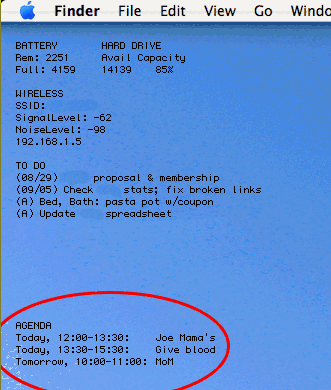
ScreenshotFor a long time, I’ve wanted fast access to Google Calendar’s agenda view. Essentially, I don’t like waiting for the page to load every time I have to remind myself of the time of some appointment in the next day or two. Feel free to read my solution and skip my disclaimers and ramblings.

The major challenges for me have been (1) that I don’t care to open iCal, since I never use it otherwise, (2) that Google presents all its data on one line (making it a bit more complicated to use Unix commands that rely on line endings), and (3) that I don’t want to take up a whole lot of bandwidth or system resources.

I think I’ve finally got a solution, and though it’s a bit complex, it’s worth sharing here. I should mention now that it is Mac-only, though I’m sure capable Windows or Linux users could adapt it readily enough.

My system involves a number of components, some non-standard (in the Mac OS), some optional. But here they are, just so you have a sense up front of where we’re headed:

  • A curl command to retrieve data from my calendar’s RSS feed
  • A launchd agent to run the curl command periodically (UPDATE: I no longer use this part)
  • Lingon to set up the launchd agent (UPDATE: I no longer use this part)
  • A Perl script to parse the XML from the calendar feed (UPDATE: The perl script now also runs the curl command directly)
  • A few Perl modules to support the script
  • Geektool to send the output of the script to my desktop periodically

What I will discuss here is how I implemented a system that is perfect for my needs. I won’t really suggest modifications or alternatives, though I welcome such thoughts in the comments.

Still, a few limitations are worth noting:

  1. As it stands, this doesn’t address multiple calendars; I have only one that I check with any frequency
  2. I use 24-hour time, because I don’t care enough to convert to 12-hour; if you do, please post your changes.
  3. At this point, the launchd command fails if I go without an Internet connection for more than 10 minutes or so (which causes the curl command to fail). I can restart it easily enough, and I usually have a connection. But, consider this fair warning, and give us a comment if you have any ideas.
  4. As I’m not an expert in any of this, really, I don’t know how portable my solution is, nor how efficiently my code is written. Comments are welcome.

Otherwise, happy reading.


Using curl to Get the Data

First, create a plain text file in your user directory. Open a new terminal window, and type
pico .gcalfeed.xml

Then type Ctrl-O, then the enter key. Finally, type Ctrl-X to exit pico.
I use the following curl command to retrieve my calendar’s private feed from Google. Note that the lines are broken artificially; otherwise you’d have a wicked horizontal scroll bar right now.

/usr/bin/curl -f -s
http://www.google.com/calendar/feeds
/[your.gmail.username]%40gmail.com/
[your-private-calendar-feed]/full
-o /Users/[your-OS-X-user-directory]/.gcalfeed.xml

First, note that I specify the full path to curl, which will become necessary once we’re using launchd to run it. The -f flag makes the command fail silently (for example, if I have no Internet connection). The -s flag keeps curl’s bulky status meters out of my system logs.

The next three lines are the URL, which you can retrieve in its entirety by going your calendar’s details page in Google Calendar. To grab the XML link for your Private Address, click the XML button in the Private Address section and copy the URL. Be sure you change the end of the URL from “/basic” to “/full” before you use it.

The last flag above, -o, tells curl to save the output to a file. Mine is in my OS X user directory to avoid permissions issues; it’s got a period at the front of its name so I don’t have to look at it all the time.

It’s worth trying all this from the OS X Terminal with your own information till you’re certain it works for you.

Using launchd to Run the curl command

UPDATE: The latest version of the script bypasses launchd altogether, simple allowing geektool to call the script directly. In other words, with the version linked to below, you can skip this section.

I used Lingon to set this up, and that’s probably the easiest way for you, too. In Lingon, click the New button. Leave the “My Agents” radio button selected, and click the Create button. Click go to the Expert panel, select all, and paste in the XML below. (Don’t worry if the indentation doesn’t show up.)

Newer versions of Lingon don’t have the Expert panel. In that case, you can also create a text document with this XML at ~/Library/LaunchAgents/ (create the LaunchAgents folder if it doesn’t exist). Follow the com.devan.gcalfeed naming convention, but append “.plist” to the filename. Once you’re done, you’ll have to log out and back in, or restart.

<?xml version="1.0" encoding="UTF-8"?>
<!DOCTYPE plist PUBLIC "-//Apple Computer//DTD PLIST 1.0//EN" "http://www.apple.com/DTDs/PropertyList-1.0.dtd">
<plist version="1.0">
<dict>

<key>Label</key>
<string>com.devan.gcalfeed</string>
<key>ProgramArguments</key>
<array>

<string>/usr/bin/curl</string>
<string>-f</string>
<string>-s</string>
<string>http://www.google.com/calendar/feeds
/[your.gmail.username]%40gmail.com/
[your-private-calendar-feed]/full</string>
<string>-o</string>
<string>/path/to/.gcalfeed.xml</string>

</array>
<key>RunAtLoad</key>
<true/>
<key>ServiceDescription</key>
<string>DownloadGCalFeed</string>
<key>StartInterval</key>
<integer>300</integer>

</dict>
</plist>

First, where I have com.devan.gcalfeed and DownloadGCalFeed (under the Label and ServiceDescription keys), you can have whatever you want. It is worth using the reverse naming convention for the former, as it will make the process readily identifiable in case you run into trouble.

Next, both the URL string and the string containing the path to your XML file should be on a single line, but once again lines have been artificially broken here.

Finally, theRunAtLoad key tells launchd to run this process once when it is loaded (which happens, among other times, when you log in), and the StartInterval key tells launchd how many seconds should pass between invocations of the process.

Once you’ve pasted this in and included your own information, click Lingon’s Save & Load button.

Using Perl to parse the XML

Download this Perl script (UPDATED to include checking for multiple calendars and with other tweaks; changes should be clear within) and uncompress it. Place gcal.pl somewhere on your system; I chose /usr/local/bin, but do what you like. Also, on lines 34 and 38, you’ve got to include the path to your own XML file.

For the script to work, you’ll need the following Perl modules installed. I use CPAN for installation, which in this case is a good idea because some of the modules have dependencies on others.

  • XML::Simple
  • Data::Dumper
  • Date::Parse

I’ve got a lot of commenting in there, but in brief, the script grabs non-all-day events from today, tomorrow, and the next day, and returns the title and date and time information for each one. Then, it grabs all-day events whose date span includes today’s date, and returns their information.

(In fact, it doesn’t grab them in that order; the last few lines do the sorting to get them that way. All the same.)

Typical output looks like this:

Today, 12:30-14:00: Meet with Andrés
Tomorrow, 08:00-09:00: Call with client
Tomorrow, 19:00-20:00: Dinner at Casbah
Through 09/14: Off from work

UPDATE: A sharp commenter alerted me to the fact that I abandoned this formatting in favor of something much more compact, just a single asterisk next to today’s events. Instructions for restoring the “Today: “, “Tomorrow: “, and “Through: ” labels appear in my response to him/her in the comments below. (Find “third problem” on this page.)

Using Geektool to View the Data

This is the easy part. Install Geektool, if you haven’t already, and set up a new entry. Make it a Shell command, and enter the following:

/path/to/your/gcal.pl

I have GeekTool run the script every 300 seconds.

Overheard at PodCamp

After a short while at PodCamp Pittsburgh 2, my ears were already overfull of emphatic platitudes and in-jokes:

  • “Your social media is you.”
  • “If you can’t delegate, you are dead, in this business, or non-business.”
  • “Did I just break the InterWebs? I hate when I break the InterWebs.”
  • “It’s all about where you are, and who you know—that hasn’t changed. That’s been Hollywood’s mandate for…120 years.”

Fuzzy math aside, I think the problem is that nobody quite knows what to say about social media, podcasting, web video. When things grow without top-down intervention, when new development comes from the periphery (or when there is no center, you might say), it’s hard to imagine how a conference like this one can amount to more than information sharing.

That can be valuable, and I suppose there’s something to be said for lonely bloggers getting in a room together. But so far, everyone seems to feel pressured to disseminate wisdom rather than to share insight.

Maybe I’m just grouchy ’cause I got here too late for any of the good schwag. And I really shouldn’t complain, anyway; I got to catch The Wailers playing a couple tunes for free at the DiverseCITY festival.

Todo

After a long, long search for a decent, well-integrated (with the rest of my life) to-do list solution, I’ve found one. It involves using Jott and GMail, and it’s so simple that I’m kicking myself for not thinking of it.

The solution, adapted from studentlinc, goes like this: You set up a GMail filter that puts all your Jotts to yourself in the same place. Studentlinc uses a label; I use GMail’s starring function since I wasn’t really doing anything productive with it anyway, and I have the messages skip the inbox for convenience. Now, whenever I click starred messages, I have a to-do list.

It’s worth noting that I extended the solution by setting up a contact in gmail just for to-do items. I called it Todo (since i don’t want to type hyphens), and made the address myaddress+todo@gmail.com. (If you don’t know about the plus sign and GMail, check this out.) Then I set up a filter starring those

This has been a life-changer. My pockets are usually filled with scraps of paper on which I keep multiple to-do lists. Since I set this up, though, I haven’t kept one list.